Ride weather
Ride weather shows the weather along your route for the hours you will be riding it: the wind against or behind you, rain, temperature and the dark.
Where to find it
- A planned ride with a route: open the ride and select Open ride weather.
- An event or permanent with a route: the Ride weather card on its calendar page. Signed out, you are asked to sign in first.
- A finished ride: its page shows the weather on the day. With a Strava recording, arrival times follow the start and pace it recorded.

Open ride weather from a planned ride with a saved route.
Start and pace
Set Start and Pace, including stops, to match your plan. Together they decide when you reach each part of the route. The forecast opens fifteen days before the ride and changes as the day gets closer; a ride further ahead shows when to check back.

Start and Pace decide when you reach each part of the route. The screenshot uses sample weather.
What it shows
Four facts sum up the ride: the temperature, rain, the strongest wind against you and where it is, and how far you ride in the dark. Below them, the map shows where the wind will be, the charts show temperature, chance of rain and wind along the route, and a table gives the forecast by distance.
While you ride
Ride weather comes with you. Once your start time has passed, open it at a control or a shop stop and it asks "Riding this now?" Select Use my location and the sheet turns into a card for the side of the road, built around where you are rather than where the plan said you would be.

48 km into the Ardattin 200, 21 minutes behind plan, with rain and a turn in the wind ahead. Sample weather.
- Where you are: how far along the route you are, with the temperature and the wind there, against you, behind you or across.
- What changes before the finish: rain starting or stopping, the wind turning, and the dark coming or the light returning, each with the kilometre and the time. Time enough to put on a jacket or fill bottles at the next shop, not the next junction.
- Your pace so far: from 20 km in, stops included, and how far you are ahead of or behind your plan.
- Forecast from here: once you are ten minutes or more ahead of or behind plan, this re-times the rest of the ride at the pace you have actually been riding, so the rain arrives on the sheet when it will reach you. Your start time stays as it was, as a brevet is reckoned.
- Road ahead: the map, charts and table show only what is left to ride. Whole ride brings back the rest.
The refresh button reads the forecast again, and the card shows when it was last read. If you stray more than a kilometre off the route, the card says how far, and picks up again when you are back on it. After the first time, the sheet finds you as soon as you open it during a ride. Your location stays on your phone; it is only used to place you on the route.
Share the forecast
Share forecast turns the sheet into one picture at the start and pace you have set: the headline, the four facts, the wind map, the elevation, and the temperature, rain and wind charts. On phones and most computers it opens your share sheet, ready for the club chat; otherwise it downloads. Whoever gets it needs no account.
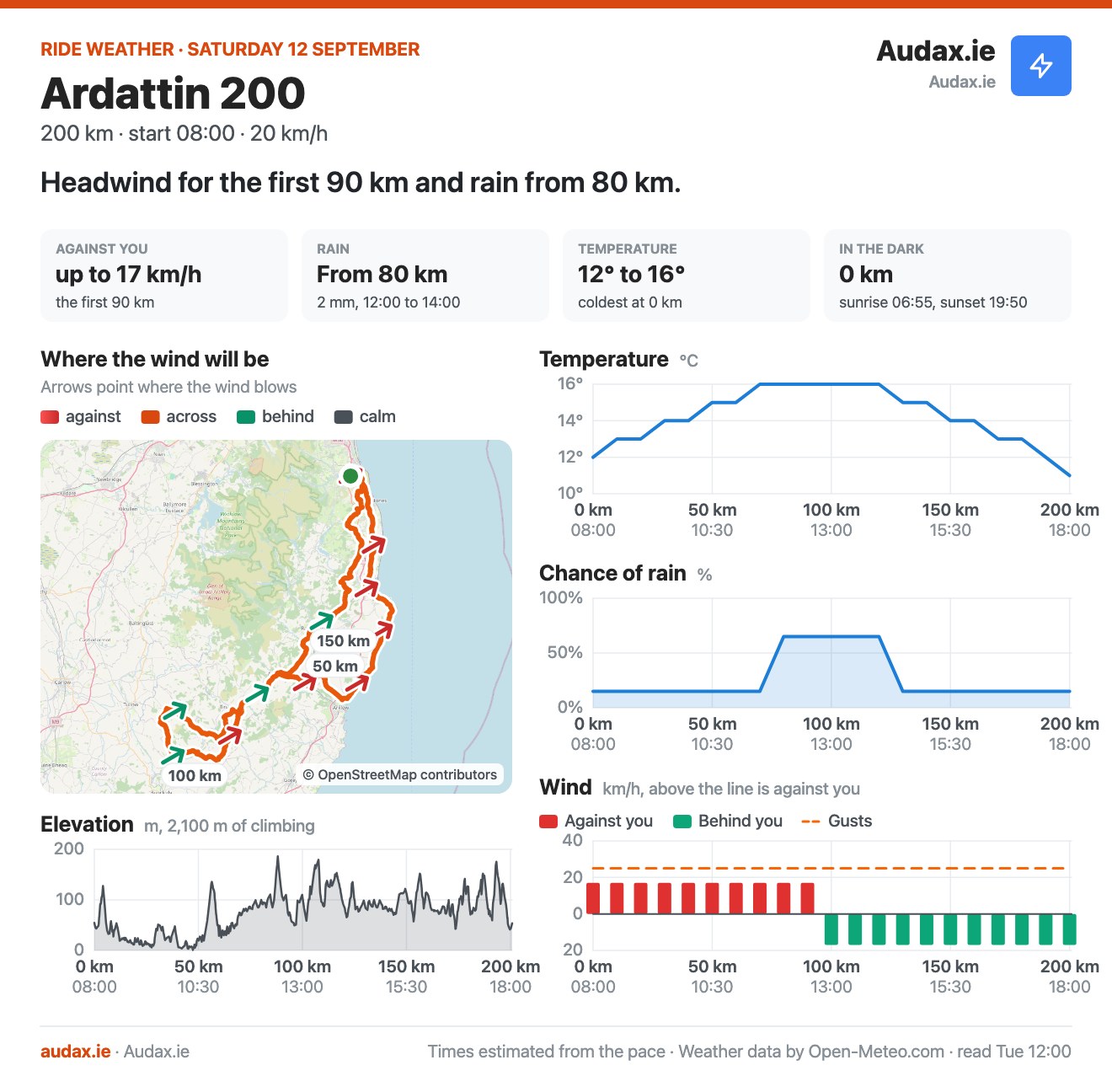
The image Share forecast makes for the Ardattin 200. Sample weather.