Tracking awards
One of the most powerful features of the tracker is its real-time award progress calculation. As you add and complete rides, the Progress page automatically works out how close you are to earning each award. This guide explains how the Progress page works, how rides contribute to multiple awards, and how to use calendar award contributions to plan your next rides.
Before you have any rides
A new account starts with empty award cards and a prompt to find your first brevet. On a phone, How awards work opens the short introduction. Add or import your rides to populate progress. Empty progress does not mean you need to create a claim or enter award totals manually.

The empty Progress page explains how rides build your award progress.
The Progress page
The Progress page is your central dashboard for award tracking. It displays a card for each award, showing your current progress calculated in real time from your ride history. Each card shows which requirements you have completed, what you still need, and how close you are to finishing the award.
Brevet 2000 and 5000 share a single card, named after the one you are riding towards: Brevet 2000, then Brevet 5000 once you pass 2,000 km. Super Randonneur is given once a season and 4 Provinces once a calendar year, so once recorded or claimed their cards show as done until 1 November and 1 January.
Progress is calculated automatically. Every time you add, update, or remove a ride, the award calculations update immediately. Completed rides count towards progress even when they still show an orange "no number" badge because their homologation number has not been added. Planned rides and those awaiting confirmation are not included in the main calculation, but they do count when you enable projections.
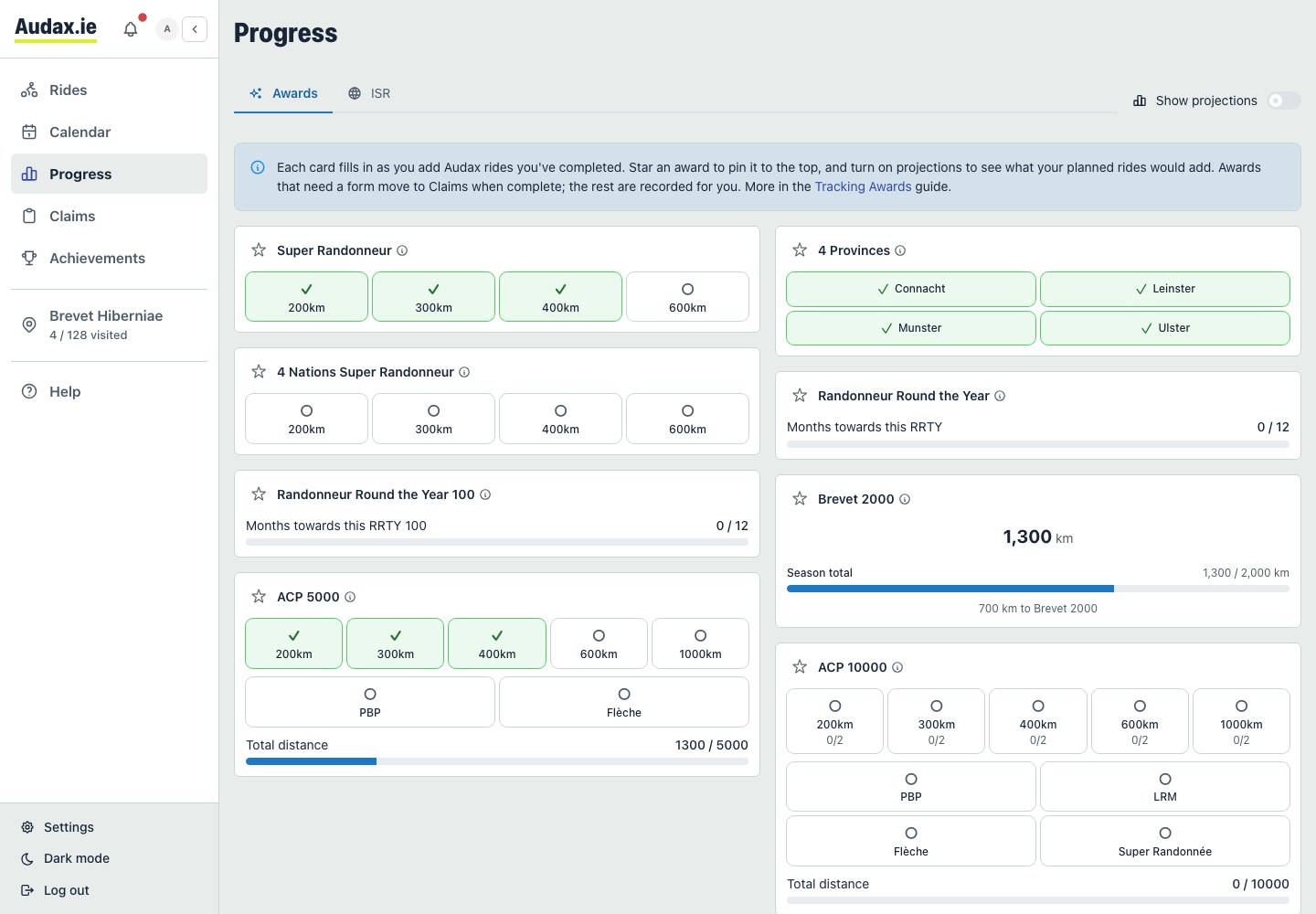
The Progress page shows your current progress and which award requirements are complete.
Multi-award ride contribution
A single ride can count towards multiple different awards at the same time. For example, a completed 300 km BRM could simultaneously contribute to:
- Super Randonneur as the 300 km leg of the SR series
- ACP Randonneur 5000 by adding 300 km towards the 5,000 km total
- RRTY as one of the 12 monthly qualifying rides
- 4 Provinces if ridden in a province you still need
The tracker handles all of this automatically. You do not need to assign rides to specific awards. The system evaluates every completed ride against all award criteria and updates your progress accordingly.
Projection toggle
At the top of the Progress page there is a projection toggle. When turned on, the award cards update to show what your progress would look like if your planned rides and rides awaiting confirmation were completed. Projected changes appear in orange so you can easily distinguish them from confirmed progress.
This is one of the most useful features in the app. It lets you see at a glance whether your planned season will get you to your goal, or whether you need to add more rides. It works across all award cards, including those on the ISR tab. Adding the PBP 2027 calendar event to your planned rides also reveals a PBP tab for registration priority, qualifying BRMs and key dates.

Toggle projections to preview how planned and awaiting-confirmation rides would affect your award progress.
Preparing for Paris–Brest–Paris
Add the PBP 2027 calendar event to your planned rides, then open the PBP tab on Progress. The dashboard brings together the event countdown, registration priority, qualifying BRMs and key dates. Registration priority and qualification use different periods; follow the dates shown in each section.

A planned PBP ride reveals the dedicated dashboard and preparation timeline.
Scroll to the qualifying series to see which distances are complete and which rides fill them. Use projections to preview planned rides; projected progress does not mean you have completed qualification or registered with the organiser.

The qualifying series separates completed requirements from distances still to ride.
Favouriting awards
Each award card has a star icon you can select to mark it as a favourite. Favourited awards are moved to the top of the page so the ones you care about most are always front and centre. Your favourites are saved to your account.
Award rules
Select "View Rules" on any award card to see its rules. The rules window explains which ride types and distances qualify, the time window, and any geographic requirements. You can check the details without leaving the Progress page.

View an award's rules, qualifying ride types, and time window from its card.
Calendar award contributions
Expand an upcoming event on the Calendar page to see which awards it could contribute to. Before you add the event, these are labelled "Potential awards".

An expanded event shows its potential award contributions before you add it as a planned ride.
After you add the event as a planned ride, the same badges are labelled "Projected awards". They show which awards would advance and by how much if you completed the event. This is especially useful when you are close to finishing an award and want to find the right event to complete it. See the Claiming Awards guide for what happens once you do complete an award.

An expanded planned event shows its projected contributions to your awards.
For completed awards, lifetime stats, past awards, and personalised artwork, continue to Achievements & Sharing.